Migrating Odoo to Zoho
Originally published: August 11, 2026 10:17:52 AM, updated: August 12, 2026 07:34:15 AM
For many businesses, Odoo starts as an attractive all-in-one business platform. It offers a wide range of applications, flexibility, and the ability to customize processes around the way a company works.
But as the business grows, the relationship with the software can change.
Customization may become harder to maintain. Some processes may require more technical involvement than expected. Users may find certain workflows unnecessarily complicated, or management may decide that a different ecosystem would better support the company's future.
That's when the question comes up:
Should we migrate from Odoo to Zoho?
For many small and mid-sized businesses, the answer can be yes. But this isn't a simple software swap. A successful Odoo to Zoho migration requires careful planning, clean data, thoughtful process design, and a clear understanding of what the business actually needs.
The good news is that migrating can also be an opportunity to simplify the way your company operates rather than simply moving old processes into a new system.
Why Are Businesses Considering a Move from Odoo to Zoho?
Odoo is a capable platform, and businesses choose it for good reasons. However, the needs of a company can change over time.
You may have started with a few Odoo applications and gradually accumulated customizations, modules, integrations, and workarounds. Eventually, the system may become more difficult to manage than it was when you first implemented it.
Other businesses are looking for a stronger combination of business applications, easier administration, better user adoption, or a more predictable way to expand their digital operations.
Zoho takes a different approach.
Instead of putting everything into one application framework, Zoho provides a broad ecosystem of connected applications that businesses can adopt according to their needs. Zoho One currently brings together more than 40 Zoho applications covering areas such as sales, finance, HR, support, collaboration, marketing, and analytics.
That flexibility can make a significant difference.
Odoo vs Zoho: It's Not Simply About Features
A common mistake is to compare Odoo and Zoho by creating a giant feature checklist.
That doesn't tell you which platform is better for your business.
The more useful question is:
Which system allows our employees to run the business more effectively?
For example, a company might use Odoo for CRM, accounting, inventory, projects, and HR. When moving to Zoho, those functions could potentially be distributed across applications such as Zoho CRM, Zoho Books, Zoho Inventory, Zoho Projects, and Zoho People.
The objective isn't to reproduce every Odoo screen.
It's to create a better operating environment.
What Can You Migrate from Odoo to Zoho?
The answer depends on which Odoo applications you're currently using and which Zoho applications will replace them.
Common migration areas can include customer and supplier records, products, sales information, financial records, inventory data, employees, projects, documents, and historical information.
However, not every piece of data should automatically be moved.
This is an important distinction.
A migration is a good opportunity to remove duplicate contacts, outdated records, unused fields, and obsolete workflows. Moving everything simply because it exists in Odoo can make the new system unnecessarily complicated.
Zoho itself recommends identifying the required data, cleaning the source information, and testing with a smaller sample before importing large datasets.
Need Help Implementing Zoho for Your Business?
Choosing the right Zoho applications and configuring them correctly can make a huge difference. Our experts can help you implement Zoho solutions tailored to your business needs.
Get Expert ConsultationMapping Odoo to the Zoho Ecosystem
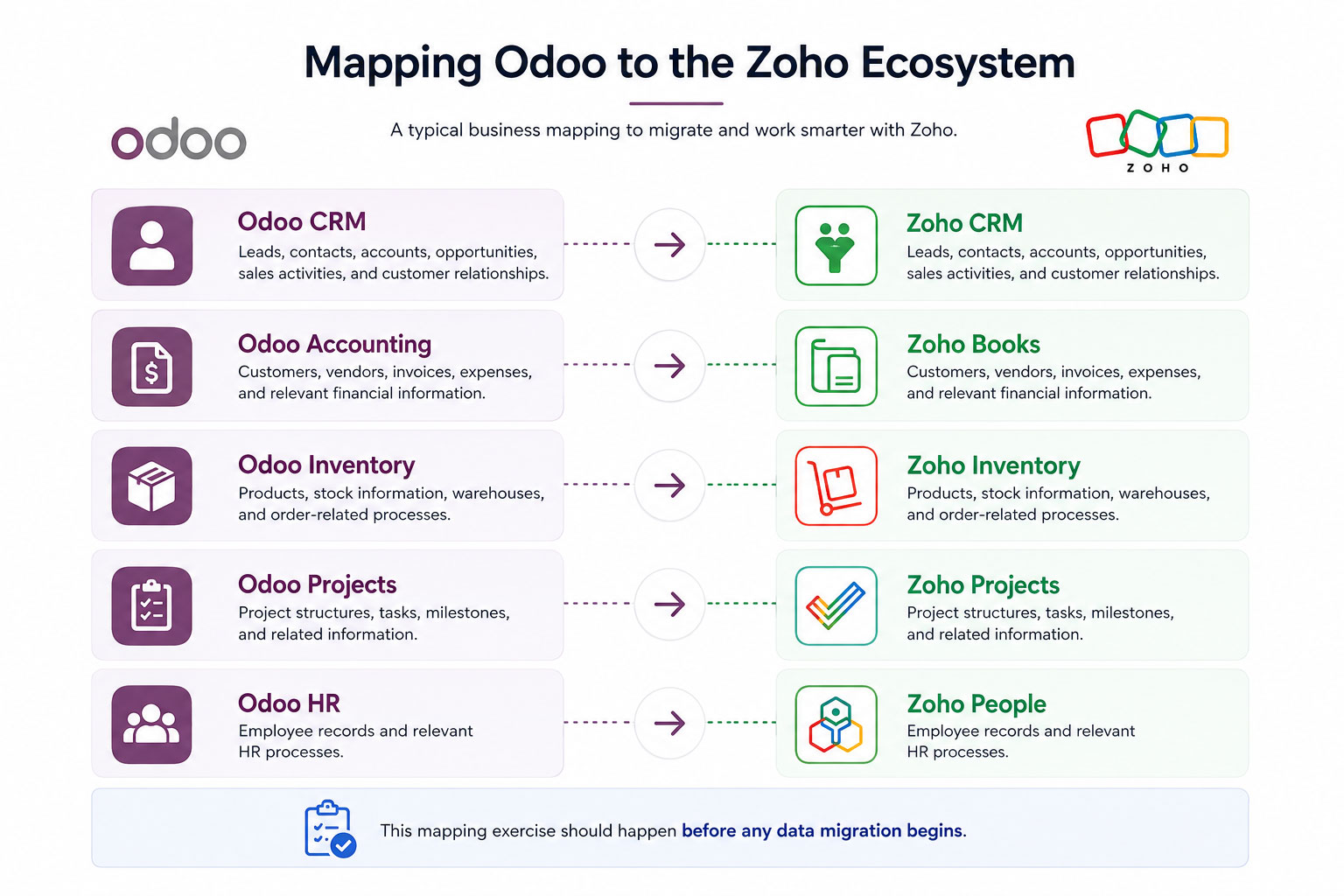
One of the most important parts of the project is deciding which Zoho application should replace each Odoo function.
A typical business might create a structure like this:
Odoo CRM → Zoho CRM
Leads, contacts, accounts, opportunities, sales activities, and customer relationships can be moved into Zoho CRM.
Odoo Accounting → Zoho Books
Customers, vendors, invoices, expenses, and relevant financial information can be migrated into Zoho Books, depending on the organization's accounting requirements.
Odoo Inventory → Zoho Inventory
Products, stock information, warehouses, and order-related processes can be mapped to Zoho Inventory.
Odoo Projects → Zoho Projects
Project structures, tasks, milestones, and related information can be redesigned within Zoho Projects.
Odoo HR → Zoho People
Employee records and relevant HR processes can be moved into Zoho People where the functionality fits the organization's requirements.
This mapping exercise should happen before any data migration begins.
Don't Copy Your Odoo Setup Exactly
This may be the most important advice for an Odoo to Zoho migration.
Don't rebuild Odoo inside Zoho.
If a workflow requires 12 steps in Odoo because of historical customization, that doesn't automatically mean the same 12 steps are necessary today.
Take the opportunity to ask why each process exists.
Perhaps an approval was introduced years ago but is no longer needed. Maybe employees manually enter information in several places because two systems weren't connected. Perhaps a custom report exists simply because management couldn't get the information they needed from the standard system.
Migration gives you a chance to challenge those assumptions.
A better system isn't necessarily one that contains everything your old system contained.
It's one that makes the important work easier.
Data Migration Is More Than Exporting a CSV
CSV files make data migration look deceptively simple.
Export the data from Odoo, import it into Zoho, and you're finished.
In reality, the difficult part is usually data mapping.
Odoo and Zoho may use different field structures, relationships, naming conventions, and business logic.
For example, an Odoo customer record may contain information that needs to be separated into multiple fields or mapped differently in Zoho CRM.
Products may require different categories, units, tax configurations, or inventory structures.
This is why data should be reviewed before migration rather than after.
What About Historical Data?
Historical data requires careful consideration.
Do you really need every transaction from ten years ago inside the new system?
Sometimes the answer is yes, especially for regulatory, accounting, or operational reasons.
Sometimes the better approach is to migrate active records and retain older information separately for reference.
The right strategy depends on your industry, reporting requirements, accounting practices, and legal obligations.
The goal is to preserve what the business needs without filling the new platform with information nobody uses.
Can Zoho Handle Custom Business Processes?
Yes, and this is one of Zoho's important strengths.
Not every business operates according to standard workflows.
Zoho provides customization options across its applications, while Zoho Creator can be used when a business needs a more specialized application or workflow.
This means you don't necessarily have to abandon a unique process simply because you're leaving Odoo.
Instead, the process can be evaluated and rebuilt in a way that fits the new environment.
What About Integrations?
Most businesses don't operate entirely inside Odoo.
You may have an e-commerce website, payment gateway, payroll system, shipping platform, banking integration, or other third-party applications connected to your current environment.
These integrations need to be included in the migration plan.
Zoho supports integration with third-party applications and provides APIs and customization options for situations where a ready-made connection isn't available. Zoho One also supports third-party applications through its Marketplace and other integration approaches.
The important thing is to map the entire technology environment before deciding what will change.
Need Help Implementing Zoho for Your Business?
Choosing the right Zoho applications and configuring them correctly can make a huge difference. Our experts can help you implement Zoho solutions tailored to your business needs.
Get Expert ConsultationA Phased Migration Is Often Safer
You don't necessarily need to move everything on one weekend.
For many businesses, a phased approach is more practical.
You might start with CRM and sales, followed by finance, inventory, HR, or other departments.
Zoho's own implementation guidance recommends starting with a specific business goal or department, migrating the required data, onboarding users, collecting feedback, and then expanding to additional areas.
This approach reduces disruption and gives employees time to become comfortable with the new environment.
What Happens to Employees During the Migration?
Technology isn't usually the hardest part.
People are.
Employees become comfortable with familiar systems, even when those systems aren't particularly efficient. Changing the software can therefore create resistance.
Training should focus on how the new system helps employees do their actual jobs.
A sales representative doesn't need to know every Zoho CRM feature. They need to know how to manage their leads, follow up with customers, update opportunities, and find the information they need.
The same principle applies to finance, HR, operations, and management.
Keep training practical.
How Long Does an Odoo to Zoho Migration Take?
There isn't one standard timeline.
A small company with relatively clean data and straightforward processes may complete the transition fairly quickly.
A larger organization with years of customized Odoo workflows, multiple integrations, complex accounting, and substantial historical data will require considerably more planning.
The most important factor isn't speed.
It's making sure the business is ready before switching systems.
A rushed migration can create problems that take months to correct.
Is Migrating from Odoo to Zoho Worth It?
For the right business, it can be.
Zoho is particularly attractive to organizations that want a broad business software ecosystem without maintaining a heavily customized environment.
With Zoho One, businesses can bring sales, marketing, finance, HR, customer support, collaboration, analytics, and other functions into one connected environment.
But the decision shouldn't be based on the software name alone.
The right question is whether Zoho fits your business processes, budget, people, integrations, and growth plans better than your current Odoo setup.
The Biggest Mistakes to Avoid
A few mistakes can make an otherwise promising migration unnecessarily difficult.
Don't migrate dirty data.
Don't recreate every old customization without questioning its purpose.
Don't ignore integrations.
Don't leave employees out of the planning process.
And don't treat migration as an IT project alone.
It's a business transformation project.
The people who use the system every day should have a voice in how it is designed.
Conclusion
Migrating from Odoo to Zoho isn't about moving from one software brand to another.
It's an opportunity to rethink how your business works.
For many organizations, Zoho One provides a compelling foundation because it connects a broad range of business applications under one ecosystem while allowing companies to adopt the tools they actually need.
The smartest migration is not the one that transfers the most data or recreates the most features.
It's the one that leaves your business with simpler processes, cleaner data, better adoption, and a system that can grow with you.
Join over 145,000 SEO and Google Ads experts. We provide a community to help you engage and learn from industry experts and influencers. Join Now
World-class digital workplace software for a seamless employee experience, whether you have 10 or 10,000 employees.