Migrating SAP to Zoho
Originally published: August 17, 2026 08:41:35 AM, updated: September 17, 2026 09:05:43 AM
SAP has been a core business system for many organizations for years. It can handle complex finance, operations, supply chain, manufacturing, and enterprise processes, which is exactly why so many companies have relied on it.
But not every business stays the same.
A company that implemented SAP years ago may have very different requirements today. Perhaps the organization has become more focused on simplicity, cloud-based applications, automation, or reducing the cost and complexity of maintaining a large enterprise environment.
That is why more businesses are asking a practical question:
Can we migrate from SAP to Zoho?
The answer can be yes, but the right way to approach the project is not to think of it as simply replacing SAP with another system. A successful SAP to Zoho migration is an opportunity to review how the business operates, decide what really needs to move, clean up old data, and build a more practical digital environment.
Why Are Businesses Considering SAP to Zoho Migration?
SAP is a powerful platform, but powerful does not always mean appropriate.
Some organizations use only a small portion of the functionality available to them. Others have accumulated years of customizations, integrations, reports, and processes that make the environment increasingly difficult to maintain.
There can also be a gap between what management needs and what employees actually experience.
If employees spend too much time navigating complicated processes, entering the same information into different systems, or waiting for information from other departments, the business may start looking for a simpler approach.
Zoho takes a different approach by offering a broad ecosystem of connected applications covering areas such as sales, finance, HR, customer support, collaboration, analytics, and business automation. Zoho One is designed to bring these applications together under one platform.
For many small and mid-sized businesses, that makes Zoho an interesting alternative to a traditional enterprise software environment.
Is Zoho Really an Alternative to SAP?
This is where businesses need to be realistic.
Zoho should not automatically be presented as a one-to-one replacement for every SAP implementation.
SAP can support highly complex enterprise environments, including specialized manufacturing and supply-chain scenarios. If your organization depends heavily on advanced SAP-specific functionality, the migration needs to be evaluated carefully.
However, many businesses use SAP for a combination of functions such as CRM, accounting, inventory, HR, projects, reporting, and internal collaboration.
For these organizations, Zoho can provide a strong alternative, particularly when the objective is to simplify the technology environment rather than reproduce every SAP feature.
The question isn't:
"Can Zoho copy everything SAP does?"
A better question is:
"Can Zoho support everything our business actually needs?"
That distinction can completely change the migration strategy.
Need Help Implementing Zoho for Your Business?
Choosing the right Zoho applications and configuring them correctly can make a huge difference. Our experts can help you implement Zoho solutions tailored to your business needs.
Get Expert ConsultationWhat Does SAP to Zoho Migration Actually Involve?
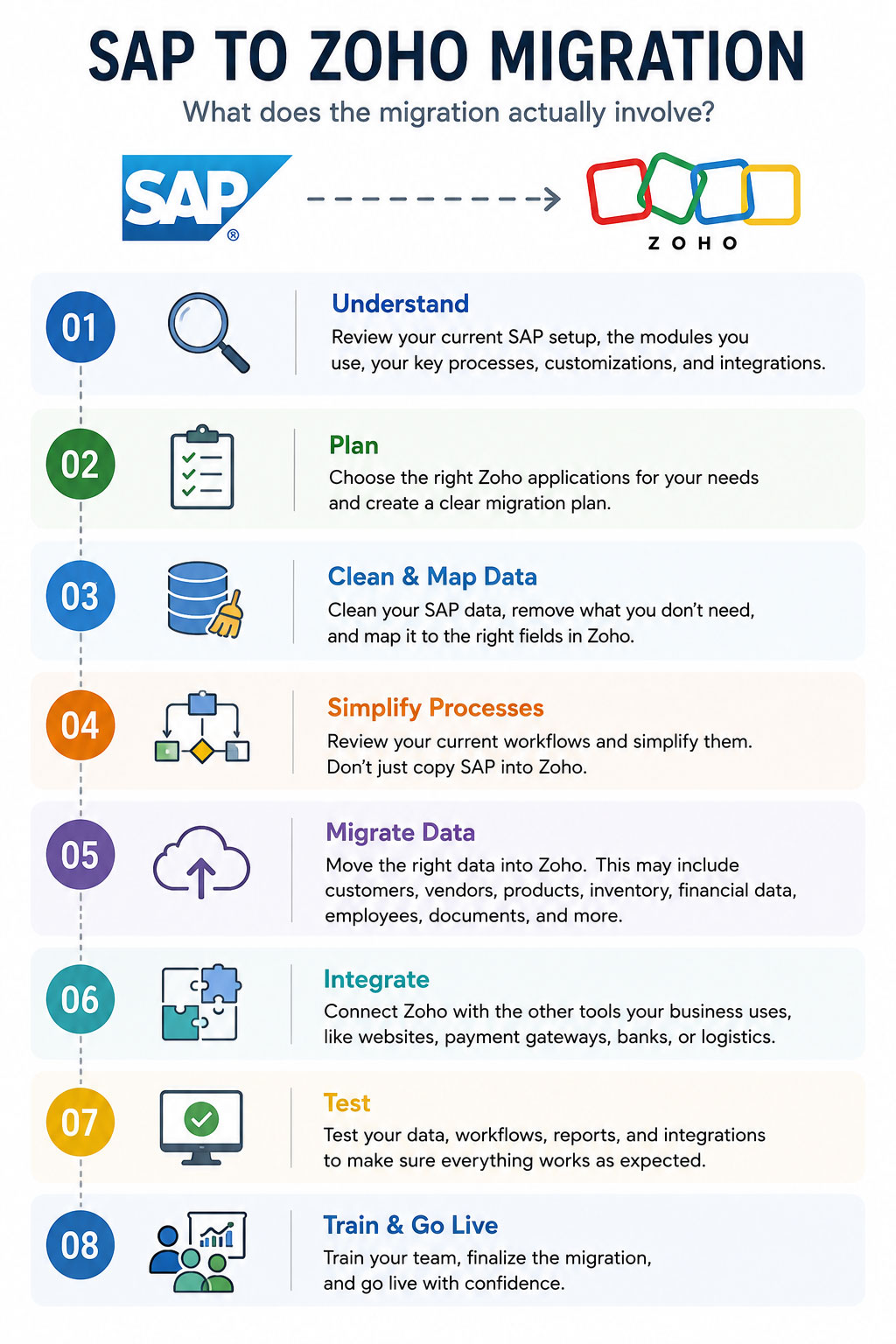
A migration is much more than exporting a database and importing it into Zoho.
First, you need to understand your current SAP environment. Which modules are being used? Which processes depend on SAP? What integrations exist? Which customizations are still necessary? What data must be retained?
Then you map those requirements to the appropriate Zoho applications.
A business might use Zoho CRM for customer and sales management, Zoho Books for accounting, Zoho Inventory for inventory operations, Zoho People for HR, Zoho Projects for project management, and Zoho Analytics for reporting.
Zoho One provides a broader framework for connecting these applications and managing different areas of the business from one ecosystem.
The important point is that the migration should be designed around business functions, not simply around SAP modules.
What Data Can Be Migrated from SAP?
The answer depends heavily on the SAP environment and the Zoho applications involved.
Common migration candidates may include customer records, vendors, products, employees, accounts, opening balances, inventory information, active transactions, documents, and historical records.
But moving everything is not necessarily a good idea.
Imagine a company that has accumulated 15 years of customer records. If thousands of those records are duplicates, inactive, incomplete, or no longer relevant, transferring them into the new system only creates another data problem.
Migration is an excellent opportunity to clean the database before it reaches Zoho.
Data Migration Requires Careful Mapping
One of the most underestimated parts of an SAP migration is data mapping.
The same information may be structured differently in SAP and Zoho.
A field in SAP might need to be divided into several fields in Zoho. Some fields may no longer be required. Others may need to be created as custom fields.
This becomes particularly important when moving financial or operational information.
For example, migrating accounting data isn't necessarily the same as migrating customer records. Zoho Books supports migration from other accounting systems, including importing items, customers, vendors, opening balances, and sales and purchase transactions, but the exact migration requirements depend on the data being transferred.
The same principle applies to CRM data. Zoho CRM provides migration tools and field-mapping capabilities designed to help move data from other systems into the appropriate CRM modules.
This is why data mapping should be designed before the migration begins.
What About Historical Transactions?
This is one of the most important questions to answer early.
Do you really need every historical SAP transaction inside Zoho?
Sometimes you do. Accounting, tax, audit, legal, or operational requirements may make historical information important.
In other cases, the business may only need opening balances and active records in the new system while retaining historical SAP information separately for reference.
There is no universal answer.
The migration strategy should be based on what the business actually needs, as well as applicable accounting, tax, legal, and regulatory requirements.
Should You Recreate Your SAP Workflows in Zoho?
Usually, no.
This is one of the biggest mistakes companies can make during migration.
A business may have spent years customizing SAP to accommodate specific processes. When moving to Zoho, the natural temptation is to reproduce those processes exactly.
But migration is a chance to ask why those processes exist in the first place.
Perhaps an approval workflow can be reduced from five steps to two. Maybe employees are entering information manually because an integration was never available. Perhaps a report exists because management couldn't easily access the underlying data.
You don't want to carry unnecessary complexity from the old system into the new one.
The goal should be to improve the process, not preserve every historical decision.
What About SAP Integrations?
This needs to be analyzed before the migration starts.
Your SAP environment may be connected to an e-commerce platform, payment gateway, banking system, payroll solution, warehouse system, website, or another business application.
Every integration should be documented.
For each one, determine whether it should be:
Replaced: A Zoho application already provides the required functionality.
Rebuilt: The integration is still necessary but needs to be connected to Zoho.
Removed: The integration is no longer required.
Replaced with a different process: The business has changed and the old integration no longer makes sense.
Zoho One also supports third-party applications and custom applications, giving businesses options when a required system does not have a standard connection.
Can Zoho Handle Custom Requirements?
This is another area that deserves proper evaluation.
Not every business operates according to standard processes.
Zoho applications provide customization options, and Zoho also offers platforms such as Zoho Creator for building custom business applications and workflows.
This means a business doesn't necessarily have to choose between accepting a rigid process and maintaining a huge enterprise system.
A better approach is to identify which processes genuinely require customization and keep the rest as simple as possible.
Should You Migrate Everything at Once?
Not necessarily.
For a large SAP environment, a phased migration can be considerably easier to manage.
You might begin with CRM and sales, then move finance, followed by inventory, HR, projects, or other business functions.
This approach allows employees to become familiar with the new environment before the next stage begins.
It also gives the implementation team an opportunity to identify problems early instead of discovering them after the entire organization has moved.
Zoho itself recommends starting with a priority business area, configuring the applications needed for that use case, migrating the relevant data, and then expanding gradually.
Need Help Implementing Zoho for Your Business?
Choosing the right Zoho applications and configuring them correctly can make a huge difference. Our experts can help you implement Zoho solutions tailored to your business needs.
Get Expert ConsultationWhat Happens to SAP During the Transition?
This should be planned carefully.
You don't want employees working in SAP and Zoho at the same time without clear rules about which system is the source of truth.
During the transition, define exactly when each department stops using SAP and begins using Zoho.
You may also need a temporary period where selected information is synchronized between systems while the migration is being completed.
The objective is to avoid duplicate data entry and, more importantly, avoid creating two conflicting versions of the same business information.
How Long Does an SAP to Zoho Migration Take?
There is no reliable one-size-fits-all timeline.
A relatively simple business with clean data and limited customization can move much faster than a large organization with years of SAP history, multiple departments, complex workflows, and numerous integrations.
The size of the database matters, but it isn't the only factor.
Process complexity, data quality, integrations, customization, user count, testing, and training can all affect the timeline.
A realistic migration plan is much more valuable than promising an artificially short implementation.
What About Employee Training?
A new system is only successful when people actually use it.
Employees who have worked with SAP for years may initially feel uncomfortable with a different interface and different processes.
Training should therefore focus on daily responsibilities rather than software features.
A salesperson needs to know how to manage leads and opportunities.
An accountant needs to understand the financial workflow.
An HR employee needs to know how employee information and HR processes work.
Management needs to know how to access dashboards and reports.
The best training is practical and role-specific.
What Are the Biggest Risks?
Most migration problems aren't caused by the software itself.
They usually come from poor planning.
Common risks include moving inaccurate data, overlooking integrations, failing to document existing processes, trying to recreate unnecessary customizations, underestimating training requirements, and switching systems before users are ready.
The good news is that most of these risks can be reduced significantly through proper discovery and testing.
Is Migrating from SAP to Zoho Worth It?
For the right organization, it can be.
The strongest candidates are usually businesses that have outgrown spreadsheets but don't necessarily need the complexity of a large enterprise environment, or organizations that have found their existing SAP setup too expensive or complicated for their current requirements.
Zoho provides applications across sales, finance, HR, support, collaboration, analytics, and other business functions, allowing companies to build a connected environment around their actual needs.
But the decision should never be based solely on software pricing.
Consider the total cost of ownership, employee productivity, maintenance, customization, integrations, training, and the ability of the platform to support your future growth.
The Smart Way to Approach an SAP to Zoho Migration
If you're seriously considering the move, don't start by exporting data.
Start with a business assessment.
Document what SAP currently does for your organization. Identify what works well, what doesn't, what is heavily customized, and what employees struggle with.
Then map those requirements to the Zoho ecosystem.
Only after that should you decide what data needs to move, what processes should be redesigned, and which integrations need to be rebuilt.
This approach turns migration from a software replacement project into a genuine business improvement project.
Conclusion
Migrating from SAP to Zoho isn't about finding another piece of software that looks like SAP.
It's about building a business environment that fits where your company is going next.
For many organizations, Zoho offers a compelling combination of business applications, customization, automation, and integration. Zoho One can provide a broader foundation for connecting sales, finance, HR, support, collaboration, analytics, and other functions within one ecosystem.
The best migration isn't the one that moves the most data or recreates the most SAP functionality.
It's the one that leaves the business with cleaner data, simpler processes, better user adoption, and a system that is easier to manage and grow with.
Join over 145,000 SEO and Google Ads experts. We provide a community to help you engage and learn from industry experts and influencers. Join Now
World-class digital workplace software for a seamless employee experience, whether you have 10 or 10,000 employees.